Hi
I've personally done something similar.
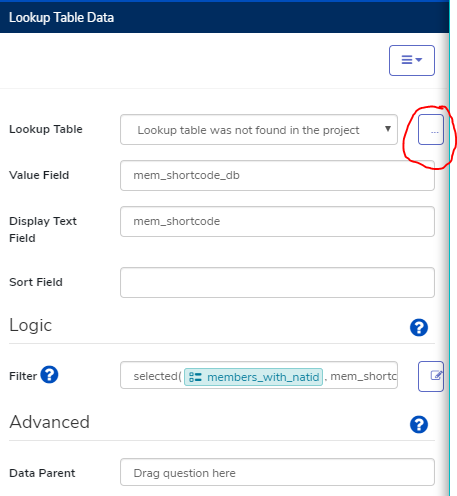
what i've found to be most useful is to use the filter field with the function "selected"
the difference between what the documentation says about advanced lookup table questions (checkbox) is that the source in this case is not a lookup table, but the repeat group itself.
so, for the source, you would type something like data/repeat_group
then you can use some sort of shortcode for the family member's name to use as a "key value" to store in the data field, and the name as a description to show up to the user. in our case, we ask for codes instead of names as to not collect any personally identifying questions as much as possible, then i just use the translate function to remove the spaces and any funny characters and use that value as the key value.
here's an example of what i wrote in the data source section of a lookup question
/data/hh_mem_info[selected(#form/id_qs/members_with_natid, mem_shortcode_db)]
/data/hh_mem_info -> this is the actual repeat group, and also the source of all the household members.
[selected(#form/id_qs/members_with_natid, mem_shortcode_db)] -> is how i'm specifying the filter. #form/is_qs/members_with_natid is another multi-select checkbox question with household members as answers but is filtered for something else (14+years old)
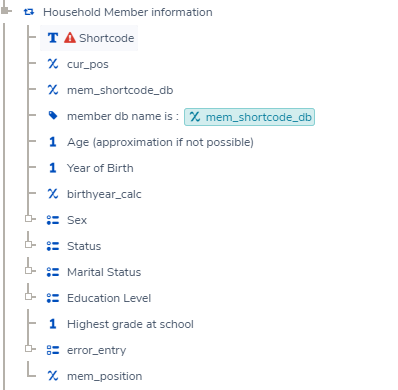
mem_shortcode_db is that calculated property in the repeat group that removes those special characters and spaces from the member's shortcode entered by the users. it is also what fills the members_with_natid question as space separated values.
here's how the question is set up
and here's how the repeat looks on the inside (it's not the prettiest)
I hope this information helps you get what you want to get out of your application
Good luck!
Mazz